Below you can see the objects that make up a footprint.
Feel free to click on any object in the footprint to view and edit its properties in the Properties panel. Some objects may be part of a larger group or hierarchy and cannot be selected directly using the standard selection mode. In these cases, you may need to switch to Sub-Pick Mode, which allows you to select individual components within a grouped object.
You can easily toggle between the normal Pick Mode and Sub-Pick Mode at any time by pressing the P key on your keyboard. If you are having trouble selecting a specific item, try switching modes and then click the object again. Once selected, its associated properties will be displayed in the Properties panel for inspection and modification.
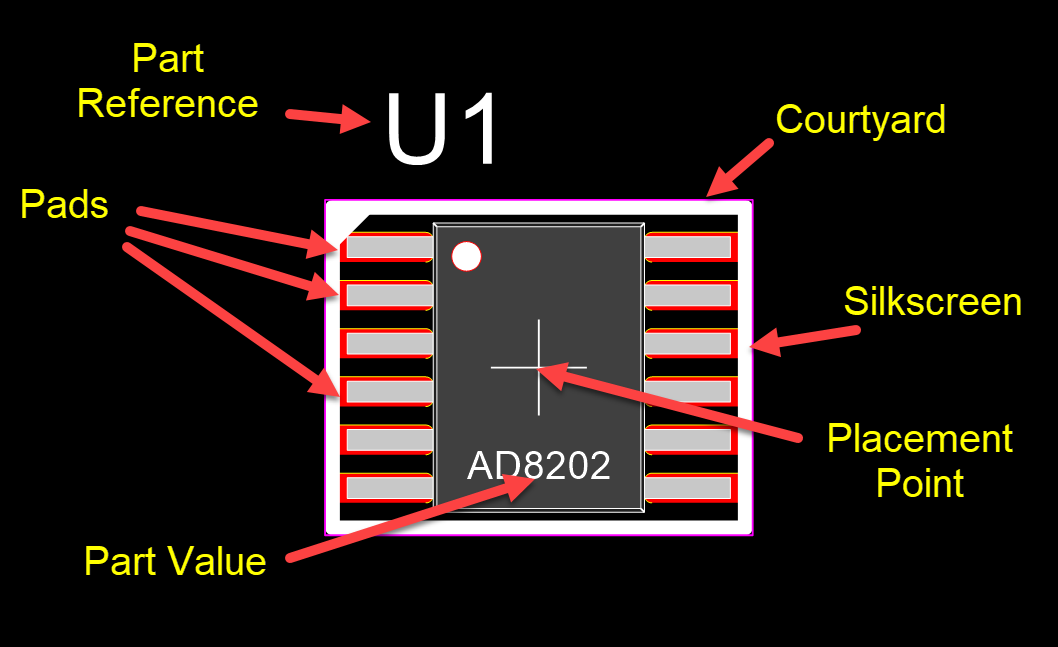
A Footprint
The Footprint Properties Editor
The properties editor allows you set any of the properties of the selected objects using individual controls specific to each of the objects parameters.